Car Trader – Buy & Sell Cars
- 3.2
- Rating
- 10.00K
- Installs
- Free
- Price

 Analysis by App-foxy
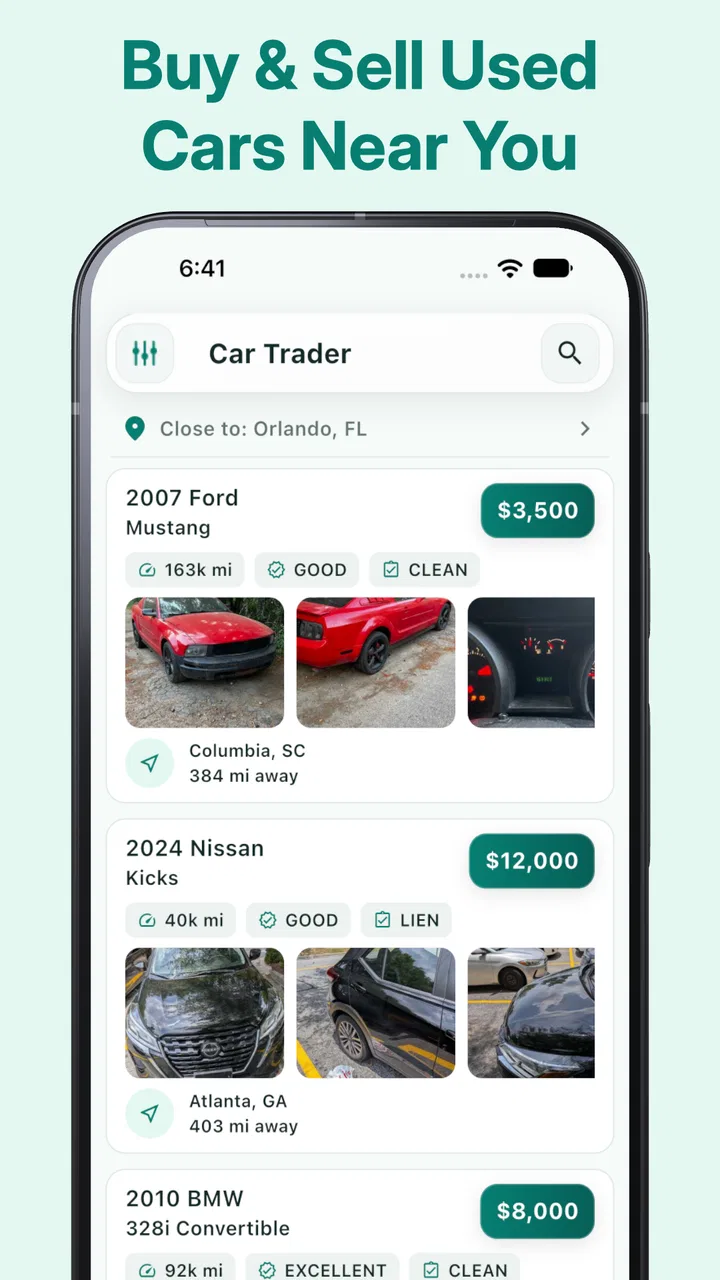
I approached Car Trader – Buy & Sell Cars as someone looking for a practical way to explore nearby used vehicles rather than as a full replacement for every part of the buying process. The app sits in the Auto & Vehicles category and is made by Car Trader Technologies Corp. Its main appeal is straightforward: it brings local car listings and local conversations into one mobile experience, so I can browse from the sofa, compare possibilities, and contact a seller without starting with a dealership visit.
That simple purpose matters for accessibility. A car search can already be tiring when I am dealing with limited time, reduced mobility, visual strain, hearing differences, anxiety around phone calls, or difficulty processing a large amount of information at once. A mobile marketplace can remove some of that pressure, but only if its navigation and communication flow remain manageable. My overall impression is useful but modest: this is a convenient discovery tool for nearby used cars, though I would still use careful checking and another method of communication before committing to a purchase.
How clearly the app supports different users
I find the app’s clearest strength is that it makes a local car search feel like a set of manageable decisions rather than one big commitment. In this section, I look at how that focus may serve buyers and sellers with different needs, while keeping in mind that a useful starting point is not the same as a complete buying process.
You May Also Like
 Google Keep - Notes and lists
Google Keep’s Quiet Growth Shows the Appeal of Simpler Notes
As mobile work gets busier, Google Keep keeps winning a simple contest: capture a thought quickly, find it later, and get on with the day.

 Blood Strike: 2.5 Anniversary
Blood Strike’s Loadouts Turn Every Drop Into a Tactical Gamble
A close look at Blood Strike’s custom loadouts: how fast access to signature weapons reshapes its battle royale rhythm, rewards preparation, and narrows the gap between fights.

 Pandora - Music & Podcasts
Pandora’s Music Is Easy to Start, but Harder to Recover
Pandora’s strength is its low-effort path from a seed to a station. Its weak spot is how much confidence it asks you to place in connection, setup, and quiet recovery.

 8 Ball Pool
8 Ball Pool Is Built on Rivalries, Rematches, and Routine
A close look at the rivalries, rematches, shared routines, and unanswered safety questions that turn a quick pool match into a persistent mobile community.

 Samsung Music
Samsung Music’s Quiet Strength Is Playing What You Already Own
Its reach comes less from spectacle than from dependable access to a personal library. That simplicity is both the app’s strongest retention engine and its ceiling.

 AccuWeather: Weather Radar
AccuWeather Review: A Quick, Clear Forecast for Everyday Decisions
For everyday plans, the best forecast is the one you can understand quickly. AccuWeather makes rain timing, radar, and local conditions easy to act on, with a few trade-offs.
More From Our News Desk



Readability and navigation during a car search
The first thing I value in a vehicle marketplace is not a flashy presentation; it is the ability to move from browsing to a sensible shortlist without getting lost. In this app, the central idea is easy to understand. I am looking for used cars, and the service is built around connecting local buyers and sellers. That makes the starting point less intimidating than a broad classifieds platform filled with unrelated products.
For a user who prefers short, direct tasks, that focus is helpful. I can treat the experience as a sequence: look through available vehicles, open the listings that seem relevant, compare the details I can see, and decide whether to contact the person selling. This kind of staged workflow is easier to manage than opening many dealership websites with different layouts and different ways of presenting information.
At the same time, used-car listings are naturally information-heavy. A serious decision may involve the vehicle’s condition, age, mileage, location, ownership history, maintenance, and the seller’s answers to follow-up questions. If the screen presents too much at once, a user with dyslexia, attention difficulties, or visual fatigue may need to slow down and revisit the same listing several times. I recommend making a short personal checklist before browsing, because it reduces the mental effort of remembering what matters from one vehicle to the next.
My most useful browsing habit is to separate “interesting” from “ready to buy.” I first collect a small group of plausible cars, then return to each listing and write down the questions that are still unanswered. This is especially useful for anyone who becomes overwhelmed by repeated scrolling or by making quick decisions under pressure. The app helps with discovery, but the organization of the final comparison still benefits from a note on the phone or a paper list.
Text size and contrast can make a major difference in a marketplace, particularly when a listing contains compact labels or several blocks of vehicle information. I would not assume that every person will find the visual presentation equally comfortable. If you rely on enlarged system text, screen magnification, or a screen reader, the sensible approach is to test the browsing flow with your usual settings before investing serious time in a search. The app is free to download, so that trial does not require a purchase decision.
The app has an average rating of 3.2 from roughly 66 ratings, which suggests a mixed experience rather than universal approval. I read that as a reason to keep expectations practical. It may work well as a local search companion, but I would not make it the only tool in a high-stakes purchase, especially if a particular navigation or reading need is essential to you.
Motor and sensory considerations
Car shopping on a phone can be easier for someone who cannot comfortably travel from one dealership to another. I can browse at home, take breaks, and return to a listing later instead of trying to complete the whole process during a single visit. That is a meaningful advantage for people with limited stamina, chronic pain, balance difficulties, or responsibilities that make travel complicated.
The same benefit applies to users who prefer not to make an immediate phone call. A local marketplace can provide a quieter first step: inspect the listing, decide whether the vehicle is worth asking about, and communicate when ready. For someone with social anxiety or a speech-related disability, that pause can make the process feel more controlled. I would still confirm how the seller prefers to communicate and keep important questions in writing when possible, so there is a clear record of what was discussed.
There is also a sensory benefit to choosing when and where to browse. A busy dealership can involve bright lighting, background conversations, sales pressure, and unexpected interruptions. Using the app from a calm room lets me control the environment and take breaks. That makes the initial research phase more accessible for people who are sensitive to noise, crowded spaces, or rapid face-to-face conversations.
However, digital browsing does not remove every physical demand. A vehicle still needs to be inspected in person, and a test drive may be necessary before buying. Someone with limited mobility may need to arrange an accessible meeting place, bring another person, or ask specific questions about entry height, seat movement, door weight, and control layout. The app can help locate a candidate, but it cannot turn an unsuitable vehicle into a suitable one.
For users with hearing loss, the most important issue is the communication stage. Written messaging is generally more manageable than an unexpected call, but I would not assume that every seller will communicate in the same way. I would state my preferred contact method early and avoid relying on a verbal promise made during a rushed conversation. For users with low vision, vehicle photos may be useful for orientation but should not be treated as a substitute for a detailed inspection or a trusted person’s description.
Motor control can also affect how comfortable browsing feels. Small touch targets, repeated swipes, or accidental taps are frustrating when hand movement is limited or tremors are involved. I found that using the app in short sessions is more practical than trying to inspect dozens of cars at once. Pausing after every few listings gives me time to record the important details and reduces the chance of contacting the wrong seller or losing track of a promising vehicle.
Situational access in everyday car shopping
A realistic example is a parent who needs a replacement car but cannot spend an afternoon visiting lots. During a quiet break at home, that person can look for nearby options, remove vehicles that are clearly unsuitable, and contact only the sellers who appear worth the time. The app does not complete the purchase, but it can reduce unnecessary travel and make the first stage less disruptive.
Another use case is someone who has recently moved and does not yet know the local used-car market. Local browsing can provide a starting point for understanding what is available nearby. I would use it to identify patterns in vehicle types and seller locations, then compare those findings with independent research before arranging a meeting. The local focus is useful, but it should not encourage me to ignore a better vehicle slightly farther away.
For a buyer without reliable transport, the nearby emphasis may be particularly valuable. A car that is technically affordable but several hours away may be impractical to inspect. Finding possibilities closer to home can make it easier to bring a trusted friend, arrange an accessible route, or return for a second look. That said, convenience should not outweigh condition, safety, or the seller’s willingness to answer basic questions.
I also see a role for sellers who need a less demanding way to reach local buyers. A private seller may prefer to begin with written questions instead of handling repeated calls. Clear photos, a precise description, and an honest list of known issues can make the interaction easier for everyone, including buyers who need extra time to evaluate information. The app can support that first connection, but the quality of the experience depends heavily on how carefully each person communicates.
When I use a local marketplace, I plan the meeting before I send a message. I decide whether I need a companion, whether the location is accessible, whether daylight is preferable, and how I will leave if the conversation becomes uncomfortable. This is not a criticism unique to this app; it is a necessary habit whenever a digital service connects strangers for a private transaction. The local feature makes meetings more practical, but it also means personal judgment remains important.
There is a useful trade-off between convenience and choice. A nearby search may produce fewer realistic candidates than a large national marketplace, yet the remaining options may be easier to inspect and collect. For someone who values reduced travel and lower planning effort, that trade-off can be worthwhile. For a buyer searching for a rare model, a specific adaptation, or an unusually narrow budget, a broader service may be the better first stop.
Where the experience still creates barriers
The biggest limitation is that a listing is only an introduction. I cannot treat the presence of a vehicle in the app as proof of its condition, history, accessibility, or suitability. A buyer who needs hand controls, extra door clearance, a particular seat height, or room for mobility equipment must ask direct questions and inspect the vehicle personally. Those requirements are too important to infer from a general listing.
Communication can become another barrier. A seller may respond slowly, provide incomplete answers, or prefer a contact method that does not suit the buyer. Someone who needs written communication may have to repeat that request. Someone who processes information slowly may also feel pressured if the seller expects an immediate decision. I recommend preparing a short message with the essential questions, including whether the vehicle is still available, where it can be viewed, and what documentation can be shown.
There is also a trust barrier for first-time users. A polished photo or an attractive price can create urgency, but neither tells me whether the transaction is safe. I would avoid sending money simply to reserve a vehicle, verify the identity and location of the seller, and arrange an inspection before making a commitment. If a seller refuses reasonable questions or pushes me to move unusually fast, I would leave the conversation rather than trying to rescue the deal.
People with limited data access or an older phone may find image-heavy browsing less comfortable, although the app’s stated minimum operating-system requirement is Android 7.0 or later. The current version is 1.8.2, so I would check that an older device handles the app smoothly before building an entire search around it. Users on iOS should also confirm that the version available on their device suits their normal accessibility settings and workflow.
The service is free, which lowers the barrier to trying it. There are also in-app purchase items ranging from $5.99 to $19.99 each, so I would pay attention to any optional purchase screen and avoid assuming that every part of the experience is included without charge. For a basic buyer who only wants to browse and make an initial connection, I would start with the free experience and decide later whether any paid option genuinely solves a problem.
Its Everyone age rating makes the app broadly approachable, but an age label does not provide guidance about the practical risks of buying a vehicle. Younger or inexperienced users may still need an adult or knowledgeable companion for inspection, paperwork, and payment decisions. The app can make the search feel simple; the transaction itself deserves much more care.
How it compares with the usual alternatives
Compared with visiting dealerships in person, this app gives me more control over timing and less pressure during the initial search. That is its clearest accessibility strength. I can screen out unsuitable vehicles before arranging transport, and I can communicate locally rather than making several trips just to ask basic questions.
Compared with a broad classifieds service, its vehicle-focused purpose may feel easier to understand. I am not sorting through unrelated categories, and the local connection is central to the experience. The trade-off is that a general marketplace or a large automotive platform may offer broader inventory, deeper vehicle history tools, more structured filters, or more established transaction support. I would choose this app for a convenient local starting point, not automatically for the most complete research process.
Compared with a dealer’s own website, the app may expose me to private sellers and a different range of nearby vehicles. That can create opportunities, but it also places more responsibility on me to verify condition, ownership, documentation, and payment arrangements. A dealership may be easier for someone who needs a formal process or predictable assistance, even if it offers less flexibility or higher prices.
My preferred workflow is to combine tools rather than force one service to do everything. I use this app to discover local candidates, keep a written shortlist, compare important details elsewhere, and arrange an inspection with support if needed. That approach preserves the app’s convenience while reducing the risk of making a decision from a single listing.
My inclusive verdict for different kinds of buyers
After using it as a local used-car search tool, I see Car Trader – Buy & Sell Cars as most suitable for people who want a low-pressure way to begin exploring nearby vehicles. It is especially helpful when travel is difficult, when a buyer wants time to think before contacting a seller, or when written browsing feels easier than walking through several dealerships.
I would recommend it to a friend who understands that the app is the first stage, not the final authority. The strongest practical tip is to create a shortlist, write down unanswered questions, and arrange an inspection with someone trustworthy. For buyers with accessibility requirements, I would add a second step: describe the exact physical features needed and ask the seller to confirm them before making a trip.
I would skip it as my main option if I needed a highly structured purchase process, extensive vehicle-history support, guaranteed communication accommodations, or a very large inventory for a specialized search. In those situations, a larger automotive marketplace, a reputable dealer, or direct help from a knowledgeable person may be a better fit.
The app has over 10K installs and is free to try, while its overall rating remains mixed at 3.2. Those details match my impression: it has a clear everyday purpose, but it is not polished enough to remove the judgment and safety work that used-car shopping requires. Its Everyone rating makes it broadly approachable, and the developer is Car Trader Technologies Corp., but accessibility in practice will still depend on the user’s device, communication needs, and the individual seller.
My final view is cautiously positive. I like the control it gives me over the early search and the way local listings can reduce unnecessary travel. I would use it when convenience and nearby contact matter, especially for planning a shortlist from home. I would not rely on it alone for verification, negotiation, or a final buying decision. Its real strength is making the first step more manageable; its real weakness is that the hardest and most important steps still happen outside the app.
FAQs for Car Trader – Buy & Sell Cars
01What is Car Trader – Buy & Sell Cars, and what can I do with it?
Car Trader – Buy & Sell Cars is a marketplace app designed to help users browse, compare, and list vehicles for sale. You can search by make, model, price, mileage, location, body style, and other details. Listings generally include photos, specifications, seller information, and contact options, making it easier to research cars and communicate with private sellers or dealers from your mobile device.
02Can I buy a car directly through Car Trader – Buy & Sell Cars?
The app primarily helps you discover vehicles and connect with sellers rather than completing the entire purchase inside the application. After finding a suitable listing, you normally contact the seller to ask questions, arrange a viewing, inspect the vehicle, and discuss payment or financing. Always verify the car’s history, ownership documents, condition, and final price before making any commitment.
03How do I sell my car using the app?
To sell a vehicle, you typically create an account or sign in, provide information such as the make, model, year, mileage, condition, location, and asking price, and upload clear photographs. Accurate descriptions and recent images can attract more serious buyers. Before publishing, review the listing carefully and check whether the app or marketplace applies fees, verification requirements, or advertising limits.
04Is Car Trader – Buy & Sell Cars safe to use?
The app can make vehicle shopping more convenient, but users should still take normal marketplace precautions. Communicate through trusted channels, avoid sending deposits without verifying the seller and vehicle, and be cautious of unusually low prices or requests for urgent payment. Meet in a public place, inspect the car in person, request documentation, and consider a professional mechanical inspection before buying.
05Does the app include financing, vehicle history, or delivery services?
Available services can vary according to your country, the individual listing, and the dealer involved. Some advertisements may provide financing information, history reports, trade-in options, or delivery arrangements, while others may offer only basic contact details. Read each listing carefully and confirm costs, eligibility, warranties, taxes, and service terms directly with the seller before relying on any additional offer.
Pros
- Large selection of new and used vehicles from different sellers.
- Detailed listings make it easier to compare prices and specifications.
- Search filters help narrow results by make
- model
- mileage
- and location.
- Useful photos provide a clearer view of each car before contacting sellers.
- Convenient way to save interesting vehicles and monitor potential purchases.
Cons
- Listing quality and accuracy can vary between individual sellers.
- Some vehicles may already be sold but remain visible for a while.
- Contacting sellers may require leaving the app or using external channels.
- Popular cars can attract many buyers
- making quick responses necessary.
- Availability and features may differ depending on your country or region.

Car Trader – Buy & Sell Cars
Gallery